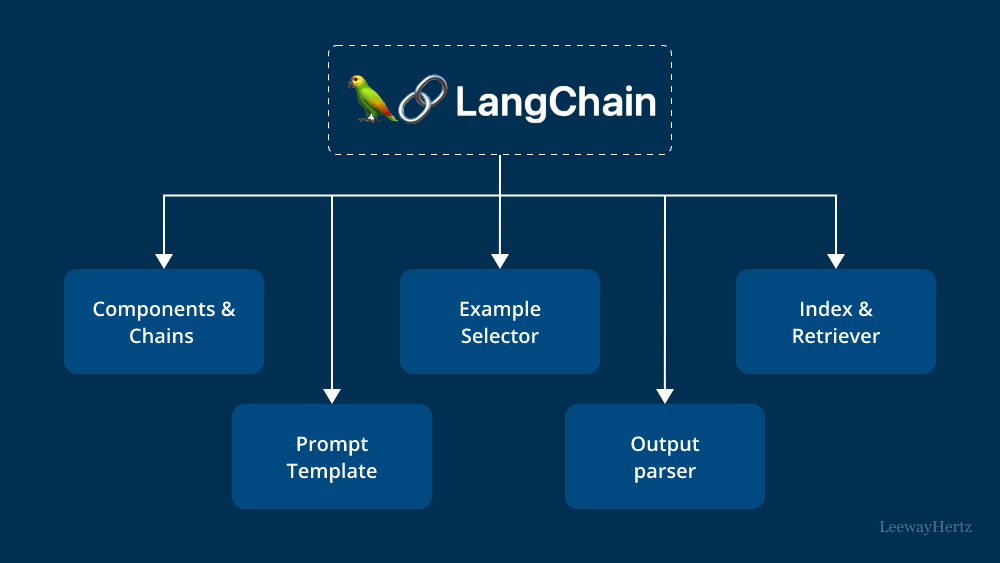
What is LangChain?
LangChain is an open-source framework for building applications powered by Large Language Models (LLMs). Think of it as the Express.js of the AI world — it does not do the heavy lifting itself, but it gives you clean abstractions and composable tools to build fast.
Without LangChain, integrating an LLM into your app means writing a lot of boilerplate: formatting prompts, parsing responses, managing conversation history, and chaining multiple calls together. LangChain handles all of that out of the box.
"LangChain is not about replacing the AI model. It's about connecting your data, your logic, and your LLM — elegantly."
1# Install core packages
2npm install @langchain/core @langchain/openai langchain
3
4# Or if using Claude (Anthropic)
5npm install @langchain/anthropic
1. Models
In LangChain, a model is a wrapper around an LLM API. You initialise it once and reuse it everywhere. LangChain supports OpenAI (GPT-4o), Anthropic (Claude), Google (Gemini), and many more — all sharing the same interface.
1import { ChatOpenAI } from "@langchain/openai"
2import { ChatAnthropic } from "@langchain/anthropic"
3
4// OpenAI GPT-4o
5const openai = new ChatOpenAI({
6  model: "gpt-4o",
7  temperature: 0.7,   // 0 = deterministic, 1 = creative
8  maxTokens: 1000,
9})
10
11// Claude (Anthropic)
12const claude = new ChatAnthropic({
13  model: "claude-sonnet-4-20250514",
14  temperature: 0,
15})
16
17// Just call .invoke() to get a response
18const response = await openai.invoke("What is RAG in one sentence?")
19console.log(response.content)
Pro tip — model swapping
- All LangChain models share the same .invoke() interface
- You can switch from OpenAI to Claude by just changing the import and class name
- Great for cost optimisation — use cheap models for simple tasks, powerful ones for complex ones
The key benefit is model-agnostic code. You can swap from OpenAI to Claude by changing just one import and class name — your business logic stays untouched. This is great for cost optimisation: use cheaper models for simple tasks and powerful ones for complex reasoning.
2. Prompts & Output Parsers
Raw strings are fragile. LangChain's Prompt Templates let you define reusable prompt structures with typed variables, system roles, and few-shot examples. Think of them as template literals — but type-safe and composable.
1import { ChatPromptTemplate } from "@langchain/core/prompts"
2
3// Define a reusable prompt with variables
4const prompt = ChatPromptTemplate.fromMessages([
5  ["system", "You are a {role} expert. Be concise and practical."],
6  ["user", "Explain {topic} in simple words."]
7])
8
9// Format the prompt with actual values
10const formatted = await prompt.formatMessages({
11  role: "Node.js",
12  topic: "event loop"
13})
14
15// Or pipe directly to the model
16const chain = prompt.pipe(openai)
17const result = await chain.invoke({
18  role: "React",
19  topic: "useEffect"
20})
Output Parsers take that raw LLM string response and convert it into structured, typed data. Using Zod schemas, you can extract objects, arrays, and enums directly from the model response — no manual string parsing needed.
1import { StructuredOutputParser } from "langchain/output_parsers"
2import { z } from "zod"
3
4// Define the shape of the output using Zod
5const parser = StructuredOutputParser.fromZodSchema(
6  z.object({
7    summary: z.string().describe("Brief summary"),
8    keyPoints: z.array(z.string()).describe("Top 3 key points"),
9    difficulty: z.enum(["beginner", "intermediate", "advanced"])
10  })
11)
12
13const prompt = ChatPromptTemplate.fromMessages([
14  ["system", "Analyze the given concept.\n{format_instructions}"],
15  ["user", "{concept}"]
16])
17
18const chain = prompt.pipe(openai).pipe(parser)
19
20const result = await chain.invoke({
21  concept: "RAG in AI",
22  format_instructions: parser.getFormatInstructions()
23})
24
25// result is now a typed object, not a raw string!
26console.log(result.summary)     // string
27console.log(result.keyPoints)   // string[]
28console.log(result.difficulty)  // "beginner" | "intermediate" | "advanced"
3. Memory
LLMs are stateless by default. Every API call is independent — the model has no memory of what you said before. LangChain's Memory module fixes this by storing conversation history and automatically injecting it into each new request.
1import { ConversationChain } from "langchain/chains"
2import { BufferMemory } from "langchain/memory"
3import { ChatOpenAI } from "@langchain/openai"
4
5const model = new ChatOpenAI({ model: "gpt-4o" })
6
7const memory = new BufferMemory({
8  returnMessages: true,      // return as message objects
9  memoryKey: "history"       // variable name in the prompt
10})
11
12const chain = new ConversationChain({ llm: model, memory: memory })
13
14// First message
15const r1 = await chain.call({ input: "My name is Arjun." })
16console.log(r1.response) // "Nice to meet you, Arjun!"
17
18// Second message — model REMEMBERS the name
19const r2 = await chain.call({ input: "What is my name?" })
20console.log(r2.response) // "Your name is Arjun." ✅
21
22// Inspect stored memory
23const history = await memory.loadMemoryVariables({})
24console.log(history)
There are three main memory types. Buffer Memory stores the full conversation — simple but costly for long sessions. Window Memory keeps only the last N messages. Summary Memory compresses old messages into a summary — ideal for very long conversations.
4. Chains
A chain is a sequence of steps where the output of one step becomes the input of the next. This is LangChain's core idea — composing small, reusable pieces into powerful AI pipelines using the pipe operator.
LangChain Expression Language (LCEL) makes this clean and readable: prompt | model | parser. Chains also support streaming out of the box — perfect for chat UIs that render responses word by word, pairing naturally with Next.js streaming routes.
Simple Chain (LCEL)
LCEL (LangChain Expression Language) uses the | pipe syntax to compose chains. It's clean, readable, and supports streaming out of the box.
1import { ChatOpenAI } from "@langchain/openai"
2import { ChatPromptTemplate } from "@langchain/core/prompts"
3import { StringOutputParser } from "@langchain/core/output_parsers"
4
5const model = new ChatOpenAI({ model: "gpt-4o" })
6const parser = new StringOutputParser()
7
8const prompt = ChatPromptTemplate.fromMessages([
9  ["system", "You are a senior {language} developer. Give practical advice."],
10  ["user", "{question}"]
11])
12
13// The pipe operator — connects all pieces
14const chain = prompt.pipe(model).pipe(parser)
15
16const answer = await chain.invoke({
17  language: "TypeScript",
18  question: "When should I use generics?"
19})
20
21console.log(answer) // plain string response
Sequential Chain
You can chain multiple LLM calls together, where each step's output feeds into the next. Useful for multi-step reasoning like summarize → translate → format.
1import { RunnableSequence } from "@langchain/core/runnables"
2
3const summarizePrompt = ChatPromptTemplate.fromMessages([
4  ["user", "Summarize this in 3 bullet points:\n{text}"]
5])
6
7const translatePrompt = ChatPromptTemplate.fromMessages([
8  ["user", "Translate to Hindi:\n{summary}"]
9])
10
11// Step 1: summarize → Step 2: translate
12const pipeline = RunnableSequence.from([
13  summarizePrompt,
14  model,
15  new StringOutputParser(),
16  (summary) => ({ summary }),   // pass to next prompt
17  translatePrompt,
18  model,
19  new StringOutputParser()
20])
21
22const result = await pipeline.invoke({
23  text: "LangChain is a framework for building LLM applications..."
24})
25
26console.log(result) // Hindi translation of the summary
Streaming Responses
One of LangChain's best features — built-in streaming. Perfect for chat UIs where you want the response to appear word by word, like ChatGPT does.
1// Stream tokens as they're generated
2const stream = await chain.stream({
3  language: "Node.js",
4  question: "How do I handle async errors properly?"
5})
6
7// Works perfectly with Express SSE or Next.js streaming
8for await (const chunk of stream) {
9  process.stdout.write(chunk)  // prints word by word
10}
11
12// In a Next.js API route with SSE (your area of expertise!)
13export async function POST(req: Request) {
14  const stream = await chain.stream(await req.json())
15  return new Response(ReadableStream.from(stream))
16}
Where to go next
Once you are comfortable with Models, Prompts, Memory, and Chains, the natural next step is RAG (Retrieval-Augmented Generation) — connecting LangChain to your own data using vector databases like ChromaDB or Pinecone. That is where most real-world AI products live.
The full LangChain JS documentation is available at js.langchain.com — well-structured and full of TypeScript examples to get you started quickly.
Share this article
Found it helpful? Share it with your network.